Junto

A unified management platform for education centers bringing room booking, attendance, communication, and analytics into one place.

View Prototype

View Presentation
Landing detail

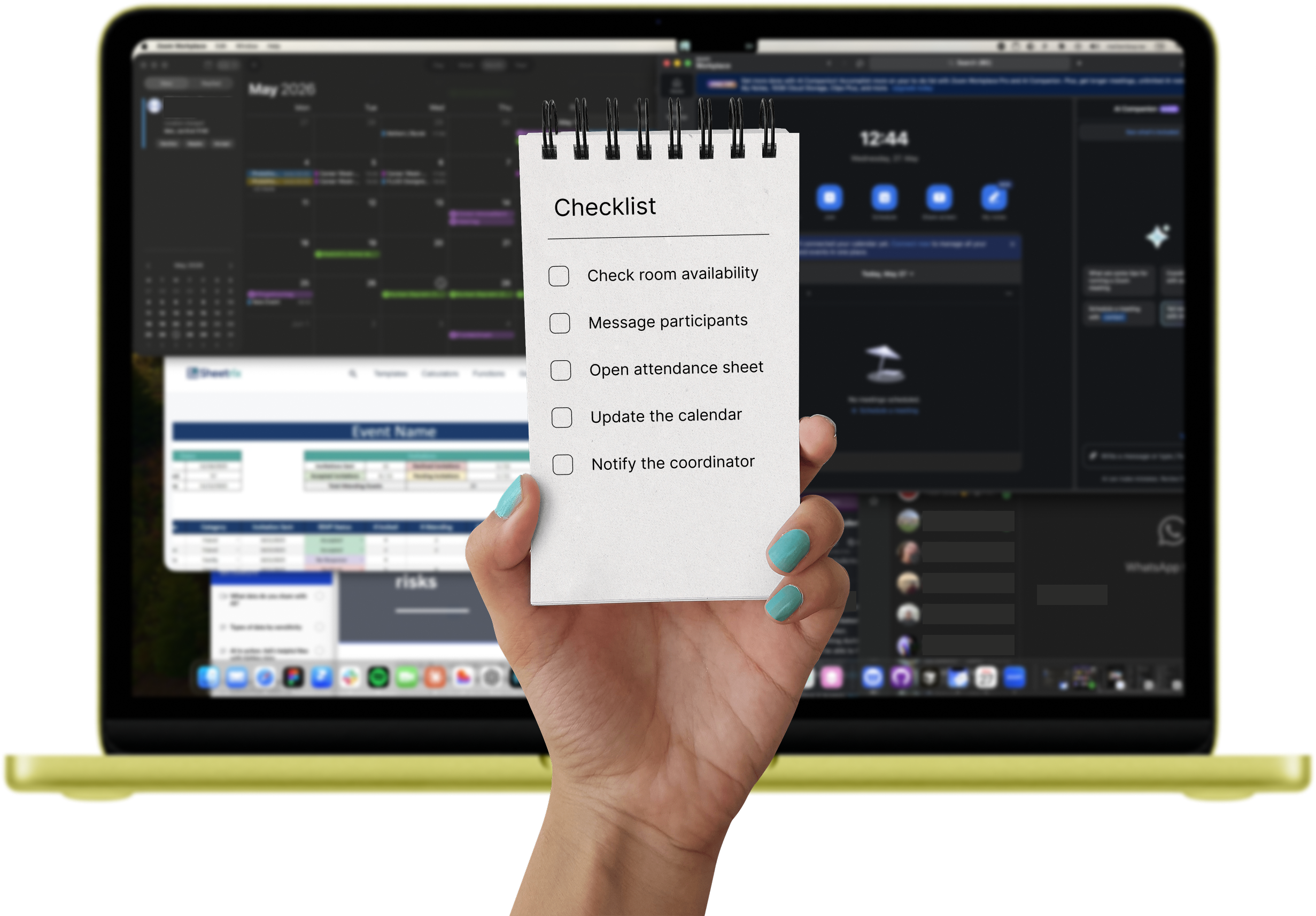
Education center coordinators and instructors are managing programs, participants, and spaces through a fragmented patchwork of disconnected tools: Excel, WhatsApp, physical wall calendars, Google Forms, Keynet, Zoom, and iPhone Notes, none of which talk to each other.

Product detail

Meet with Amy

Amy is a Senior Design Instructor at Reconnect Community Center for 8 years. She is 38 years old and living in Munich. She checks WhatsApp, email, and a physical calendar every morning before starting work, manages 3 to 4 sessions per week across shared spaces, and is comfortable with digital tools but frustrated by switching between them constantly.

Her Goal: Deliver high-quality sessions without operational distraction

Her Frustration: Scattered event creation and no single place to see her schedule, attendance, and messages
Product detail

Problem Statement

There is no single place to create an event, book a room, notify participants, and track attendance. Every task requires a different system and often a different person. Coordinators must check three or more sources just to answer "what's happening today?" Room bookings are made by messaging someone and trusting the chain: a coordinator forwards to an instructor, who has to take it on faith. Cancellations reach participants only if the manual relay does not break down.
Research Process

Moderated User Interviews

6 participants · 5 instructors, 1 center staff

Conducted primary research with both freelance and full-time educators to capture real operational behavior. Followed a structured discussion guide covering daily workflows, scheduling, communication, and tool usage. Sessions were 10 to 15 minutes, recorded with consent. Participant scope was scoped intentionally due to time constraints, prioritizing depth over volume.

A portrait of you.

Competitive Analysis

4 platforms benchmarked

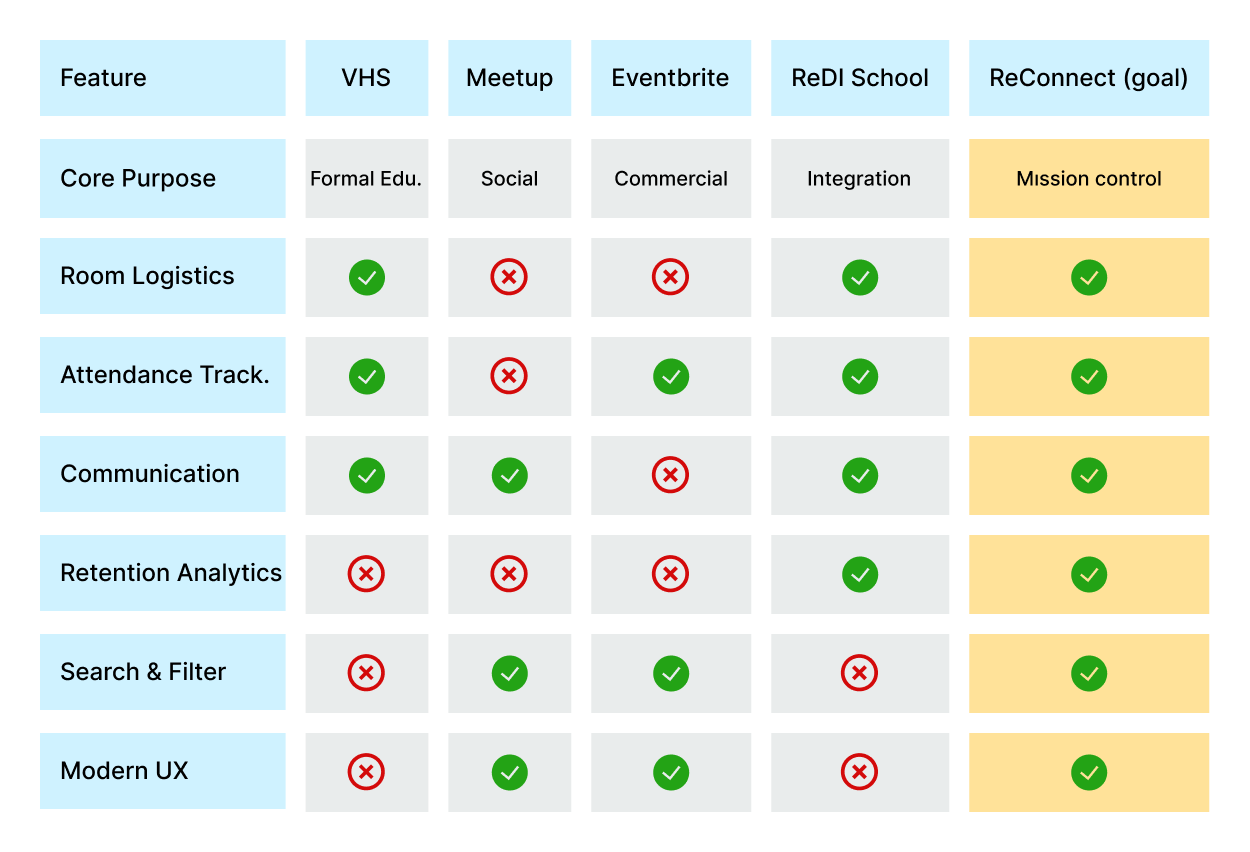
Evaluated VHS München, Meetup, Eventbrite, and ReDI School across 6 capability dimensions: room logistics, attendance tracking, communication, retention analytics, search and filter, and UX quality. Identified a clear market gap: no existing tool serves operational management inside an education center end-to-end.

Supplemented the analysis with user review mining across competitor platforms. Recurring complaints around confusing navigation and broken task flows directly shaped the decision to prioritize user flow design as a core output.

A portrait of you.

Affinity Mapping

5 insight clusters

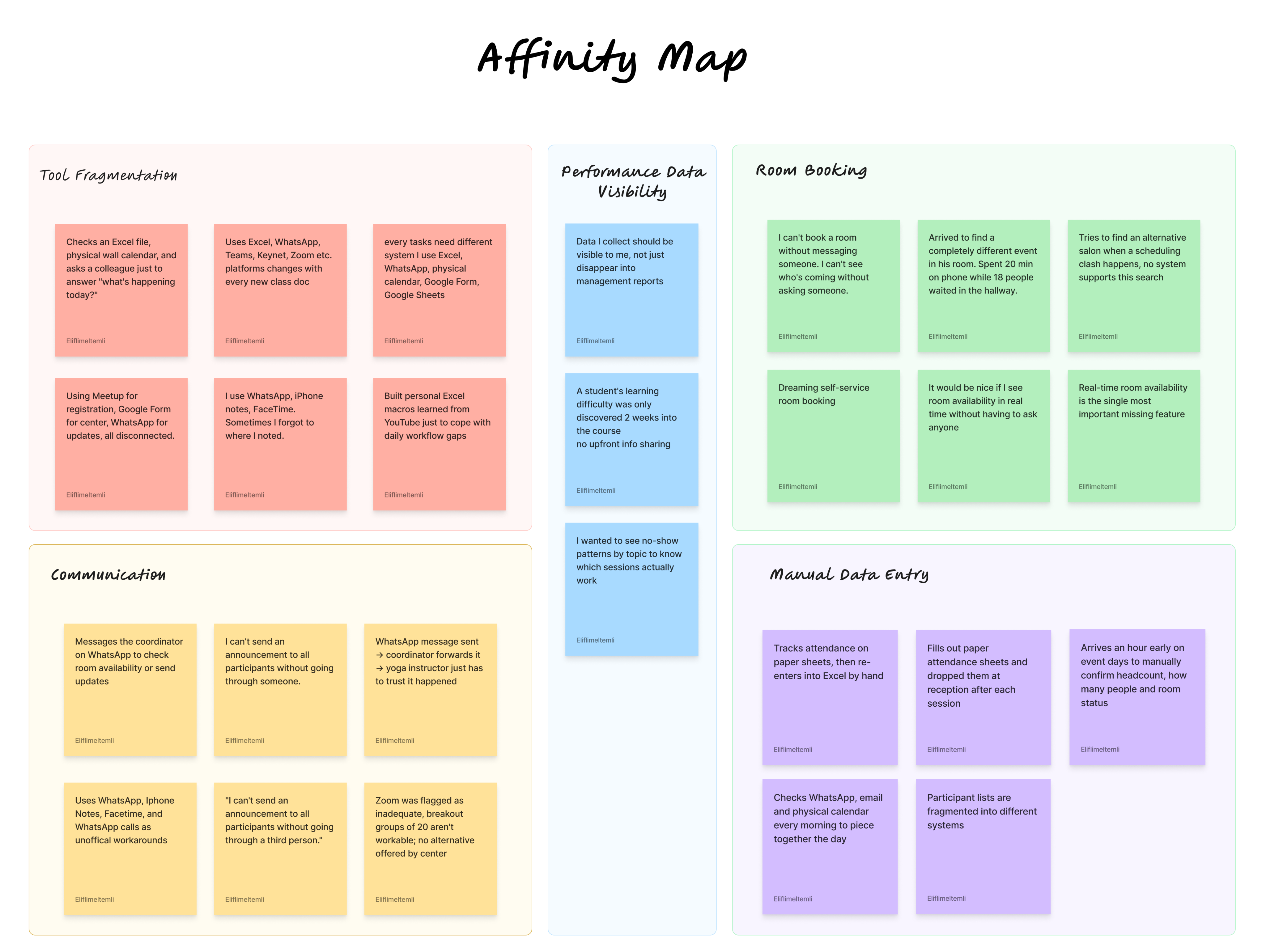
Synthesized raw interview data into themed clusters: tool fragmentation, communication breakdowns, room booking friction, performance data visibility, and manual data entry. This step translated qualitative findings into structured, actionable insights.

A portrait of you.

HMW Questions

Opportunity framing

Reframed 3 pain point cluster into How Might We questions to open the solution space without anchoring too early. Kept questions specific enough to guide ideation, broad enough to allow creative range.

A portrait of you.

Ideation and Brainstorming

Feature prioritization

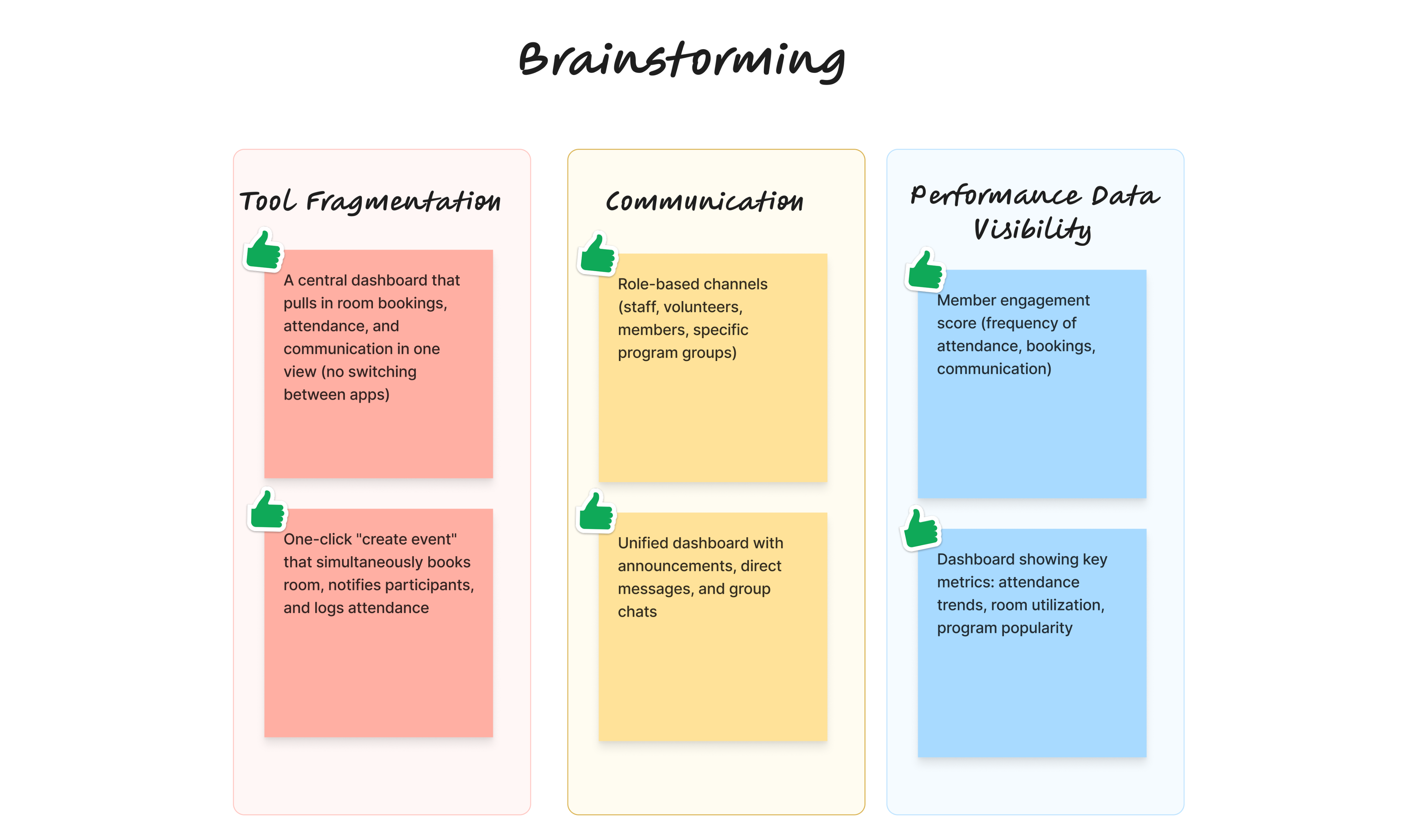
Generated concepts against each HMW prompt. Prioritized ideas based on user impact and technical feasibility, filtering toward a unified, role-based platform that removes third-party dependency from every core task.

A portrait of you.

Information Architecture

Role-based structure

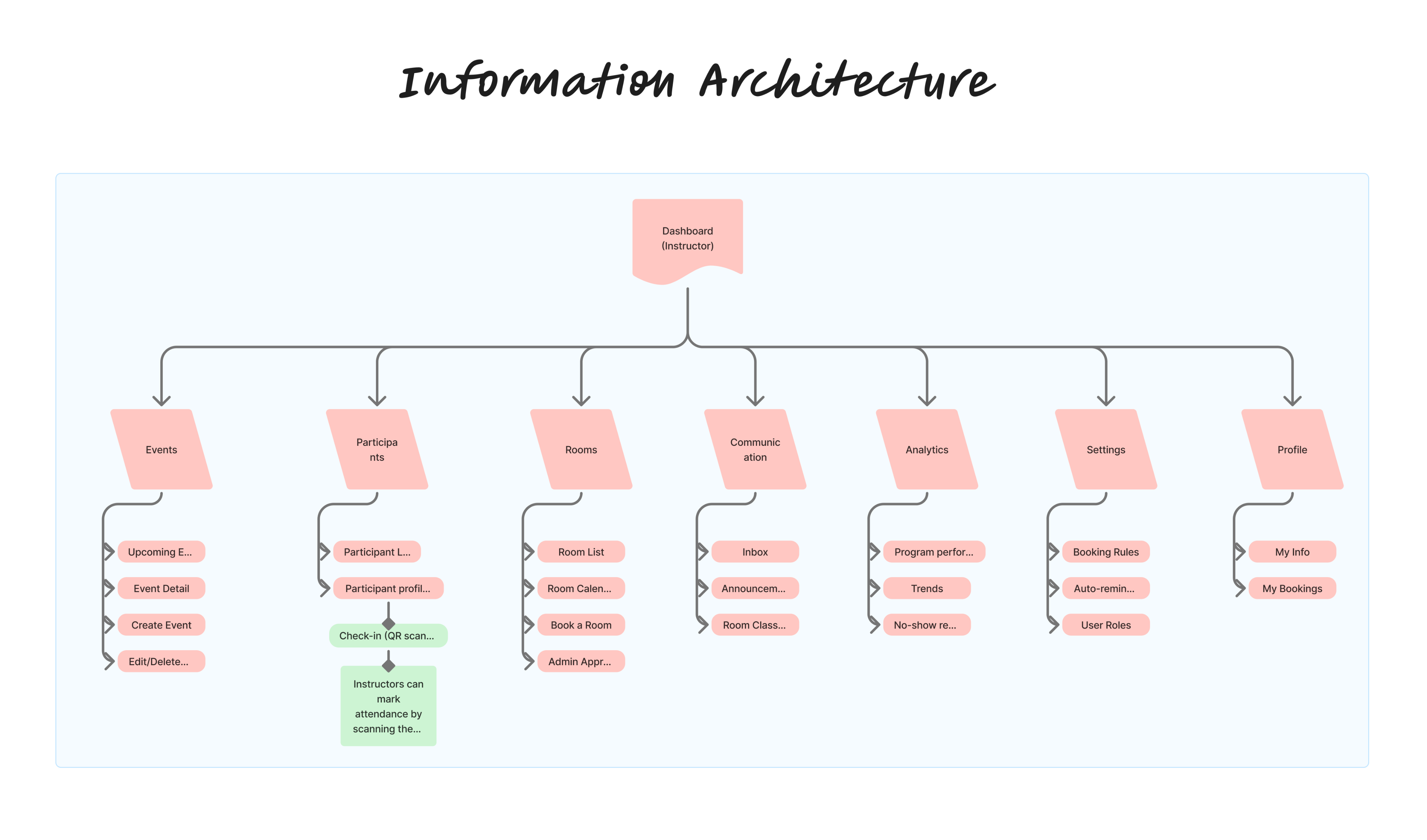
Defined a two-role system (instructor and admin) with five core modules: events, rooms, communication, analytics, and settings. Built to support independent task completion without approval chains or manual handoffs.

A portrait of you.

User Flow

End-to-end task mapping

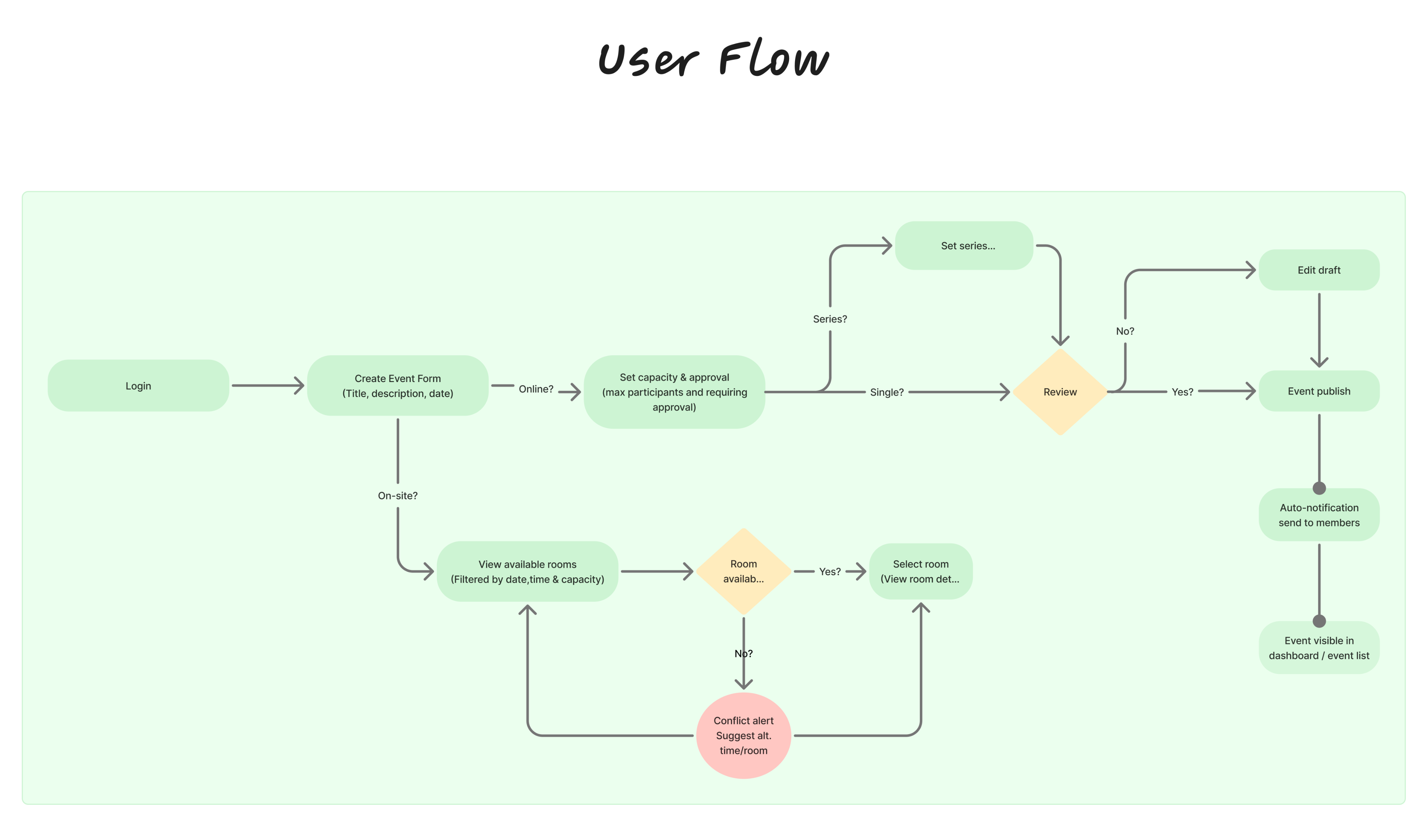
Mapped the critical path: event creation with integrated room booking and automatic participant notification. Flows account for conflict detection, online and on-site scenarios, and edge cases. Grounded in competitor review findings showing user flow clarity as the single most complained-about gap in the market.

Design Decisions

Automated Participant Notifications Instead of Manual Broadcasts

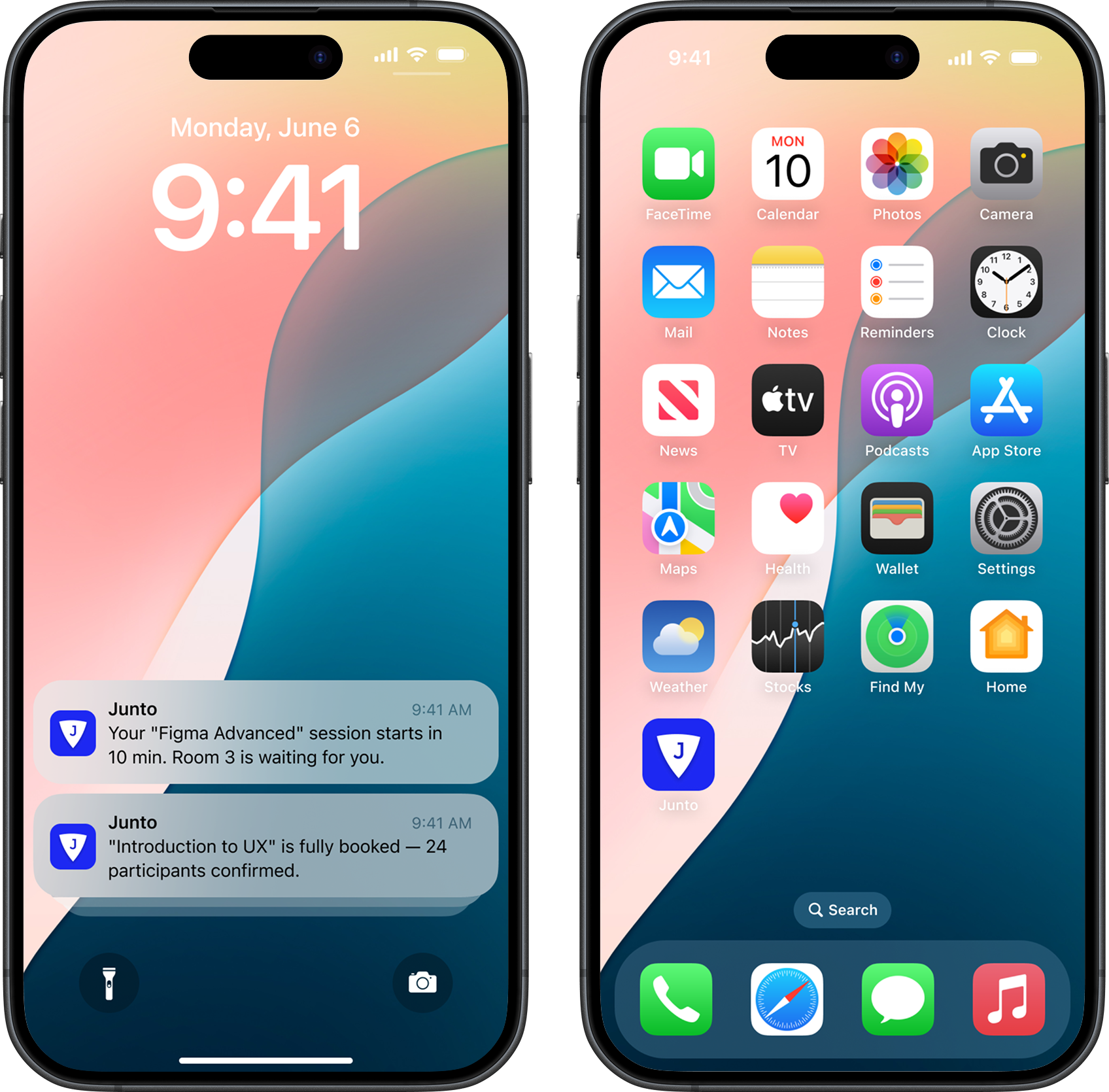
Users could not send announcements without routing through a third party. Automating notifications on event creation, updates, and cancellations directly addresses the communication breakdowns documented in both interviews and competitor reviews.

Real-Time Room Availability Instead of Manual Confirmation

Every participant described the same workaround: message someone, wait, trust the answer. A live availability calendar removes the human relay entirely and was the single most requested feature across all 6 interviews.

Role-Based Dashboard Instead of a Single View

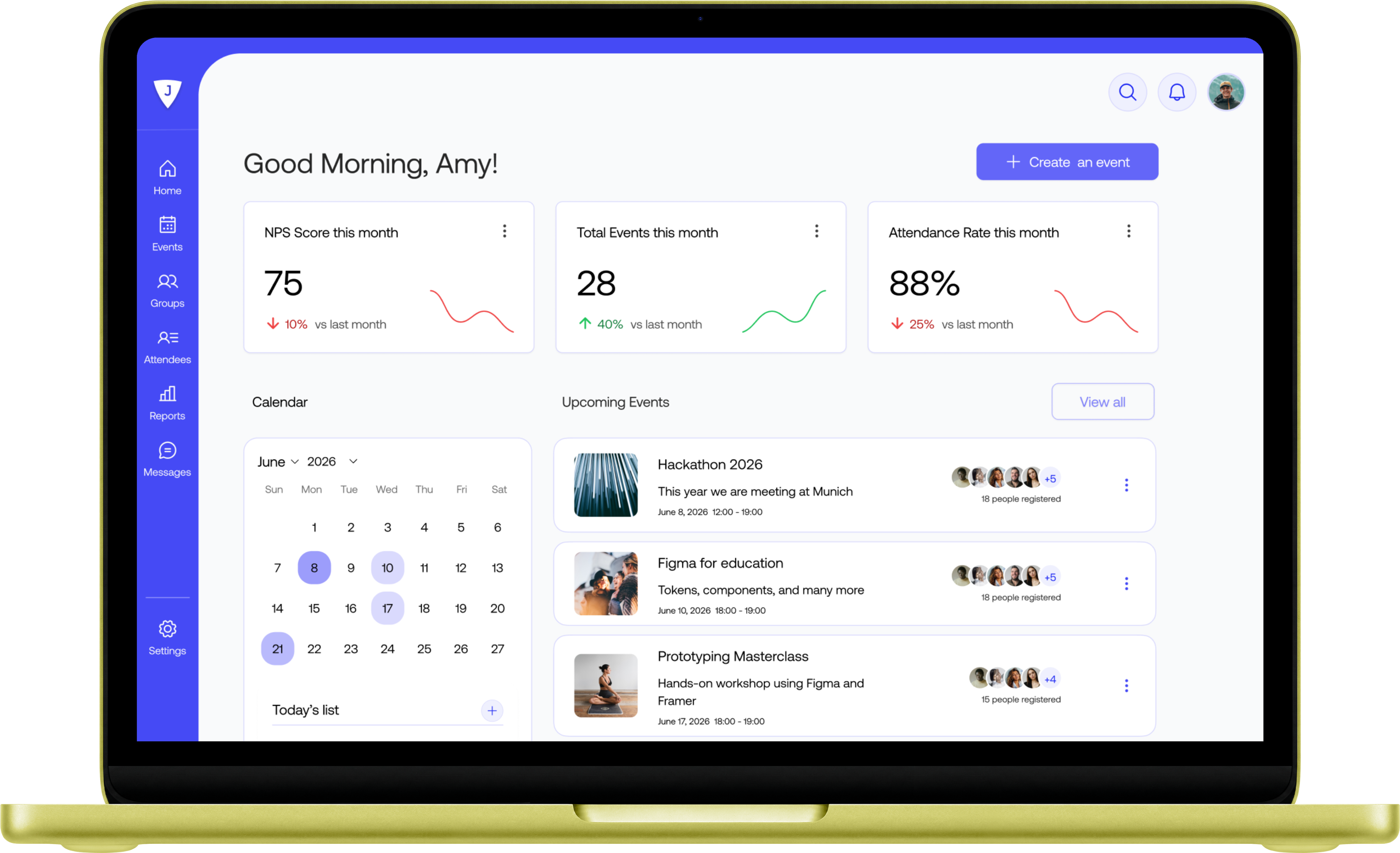
Research showed coordinators and instructors have fundamentally different needs. Giving each role a tailored dashboard reduces cognitive load and removes irrelevant actions from view, so users reach their most critical tasks without scanning through noise.

In-Platform Attendance Tracking Instead of Paper and Excel

Attendance data was being collected on paper, re-entered manually into Excel, and then lost in management reports. A QR-based check-in system keeps data in the platform, visible to the people who collected it, and ready for analytics without extra steps.

Conflict Detection Instead of Post-Booking Fixes

A real incident surfaced in research: an instructor arrived to find a different event in their room with 18 people waiting outside. Proactive conflict detection with alternative suggestions prevents the problem before it reaches users, not after.

One-Click Event Creation with Integrated Room Booking

Coordinators were using an average of 4 to 5 separate tools to complete a single event setup. Collapsing event creation, room booking, capacity setting, and participant notification into one flow reduces task time and eliminates cross-platform errors.

One flow that creates the event, checks room availability, sets capacity, and notifies participants automatically.

No tab switching. No manual relay.

Final Screens

Built from what instructors actually said

Product detail

After Junto

By the beginning of her session, Amy hadn't switched a single tab.

  • Her session was ready,
  • her room was booked,
  • and her participants were notified all before session.

For the first time in years, she walked into the classroom thinking about teaching.

Now, she spends just 40 seconds creating event and 15 seconds checking attendance.

Prototype tested with participants.

Key finding: event creation flow completed in under 40 seconds with no assistance. Identified friction points in room selection step, flagged for next iteration.

Business Impact

Fewer Errors

Automated scheduling, notifications, and attendance tracking reduce mistakes before they become problems.

Less Administration

Routine tasks that once required multiple tools and manual coordination now happen in a single workflow.

More Capacity

Teams spend less time on operations and more time supporting participants and growing programs.

Product detail

What’s Next?

Mobile App

Mobile App, so instructors can manage their sessions from anywhere, not just their desk.

Dashboard for Center Staff

Coordinators get their own view included room status, daily schedule, and participant updates in one place.

Waitlist Management

Participants join the waitlist and get notified when a spot opens.

Let’s work together

Looking for a junior UX/UI role or internship and open to volunteer projects or freelance opportunities.

Junto

A unified management platform for education centers bringing room booking, attendance, communication, and analytics into one place. t a little more about what this is

View Prototype

View Presentation

Landing detail

Education center coordinators and instructors are managing programs, participants, and spaces through a fragmented patchwork of disconnected tools: Excel, WhatsApp, physical wall calendars, Google Forms, Keynet, Zoom, and iPhone Notes, none of which talk to each other.

Product detail

Meet with Amy

Amy is a Senior Design Instructor at Reconnect Community Center for 8 years. She is 38 years old and living in Munich. She checks WhatsApp, email, and a physical calendar every morning before starting work, manages 3 to 4 sessions per week across shared spaces, and is comfortable with digital tools but frustrated by switching between them constantly.

Her Goal: Deliver high-quality sessions without operational distraction

Her Frustration: Scattered event creation and no single place to see her schedule, attendance, and messages

Problem Statement

There is no single place to create an event, book a room, notify participants, and track attendance. Every task requires a different system and often a different person. Coordinators must check three or more sources just to answer "what's happening today?" Room bookings are made by messaging someone and trusting the chain: a coordinator forwards to an instructor, who has to take it on faith. Cancellations reach participants only if the manual relay does not break down.
Product detail

Research Process

Moderated User Interviews

6 participants · 5 instructors, 1 center staff

Conducted primary research with both freelance and full-time educators to capture real operational behavior. Followed a structured discussion guide covering daily workflows, scheduling, communication, and tool usage. Sessions were 10 to 15 minutes, recorded with consent. Participant scope was scoped intentionally due to time constraints, prioritizing depth over volume.

A portrait of you.

Competitive Analysis

4 platforms benchmarked

Evaluated VHS München, Meetup, Eventbrite, and ReDI School across 6 capability dimensions: room logistics, attendance tracking, communication, retention analytics, search and filter, and UX quality. Identified a clear market gap: no existing tool serves operational management inside an education center end-to-end.

Supplemented the analysis with user review mining across competitor platforms. Recurring complaints around confusing navigation and broken task flows directly shaped the decision to prioritize user flow design as a core output.

Affinity Mapping

5 insight clusters

Synthesized raw interview data into themed clusters: tool fragmentation, communication breakdowns, room booking friction, performance data visibility, and manual data entry. This step translated qualitative findings into structured, actionable insights.

A portrait of you.
A portrait of you.

HMW Questions

Opportunity framing

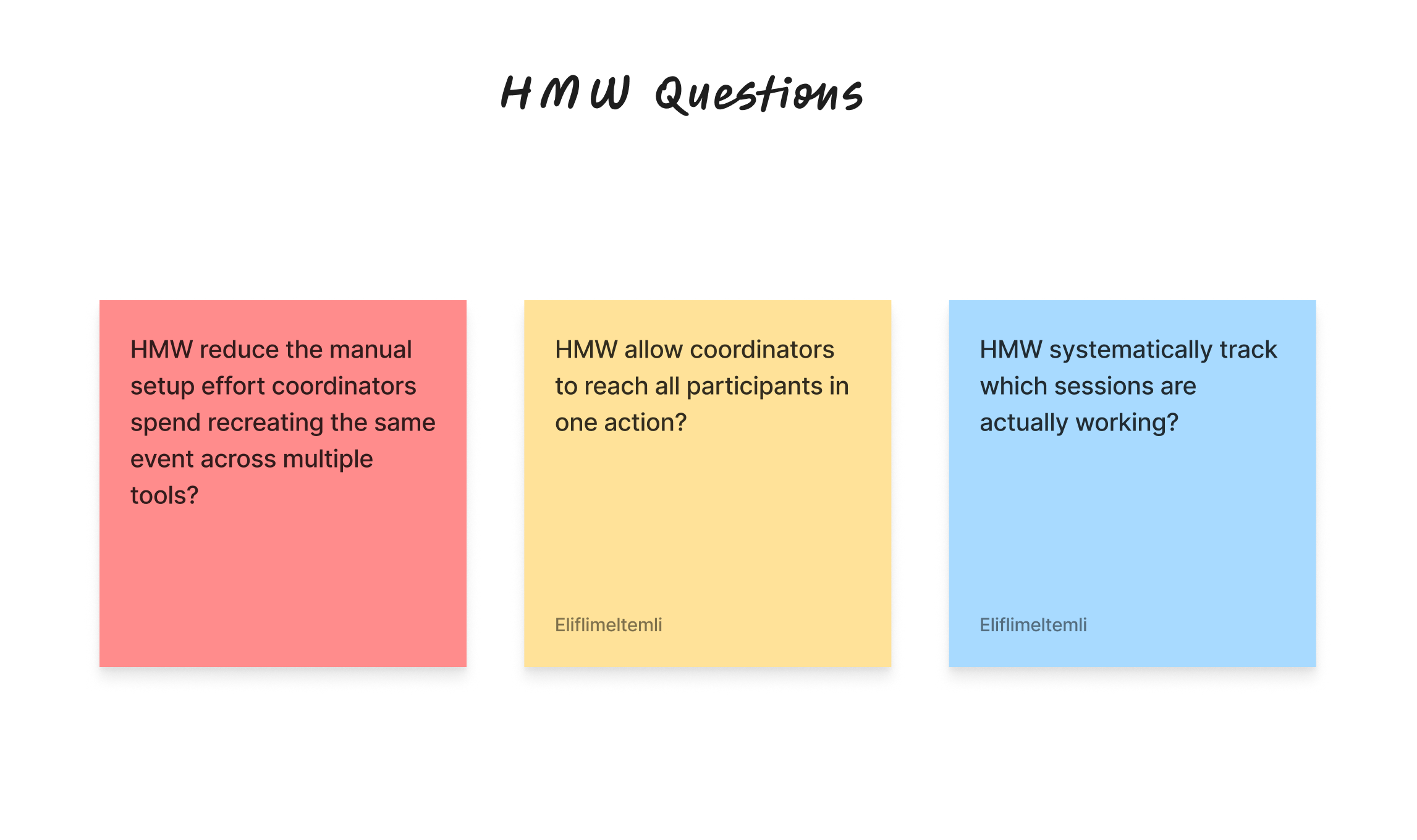
Reframed 3 pain point cluster into How Might We questions to open the solution space without anchoring too early. Kept questions specific enough to guide ideation, broad enough to allow creative range.

Ideation and Brainstorming

Feature prioritization

Generated concepts against each HMW prompt. Prioritized ideas based on user impact and technical feasibility, filtering toward a unified, role-based platform that removes third-party dependency from every core task.

A portrait of you.
A portrait of you.

Information Architecture

Role-based structure

Defined a two-role system (instructor and admin) with five core modules: events, rooms, communication, analytics, and settings. Built to support independent task completion without approval chains or manual handoffs.

User Flow

End-to-end task mapping

Mapped the critical path: event creation with integrated room booking and automatic participant notification. Flows account for conflict detection, online and on-site scenarios, and edge cases. Grounded in competitor review findings showing user flow clarity as the single most complained-about gap in the market.

A portrait of you.

Design Decisions

Automated Participant Notifications Instead of Manual Broadcasts

Users could not send announcements without routing through a third party. Automating notifications on event creation, updates, and cancellations directly addresses the communication breakdowns documented in both interviews and competitor reviews.

Real-Time Room Availability Instead of Manual Confirmation

Every participant described the same workaround: message someone, wait, trust the answer. A live availability calendar removes the human relay entirely and was the single most requested feature across all 6 interviews.

Role-Based Dashboard Instead of a Single View

Research showed coordinators and instructors have fundamentally different needs. Giving each role a tailored dashboard reduces cognitive load and removes irrelevant actions from view, so users reach their most critical tasks without scanning through noise.

In-Platform Attendance Tracking Instead of Paper and Excel

Attendance data was being collected on paper, re-entered manually into Excel, and then lost in management reports. A QR-based check-in system keeps data in the platform, visible to the people who collected it, and ready for analytics without extra steps.

Conflict Detection Instead of Post-Booking Fixes

A real incident surfaced in research: an instructor arrived to find a different event in their room with 18 people waiting outside. Proactive conflict detection with alternative suggestions prevents the problem before it reaches users, not after.

One-Click Event Creation with Integrated Room Booking

Coordinators were using an average of 4 to 5 separate tools to complete a single event setup. Collapsing event creation, room booking, capacity setting, and participant notification into one flow reduces task time and eliminates cross-platform errors.

One flow that creates the event, checks room availability, sets capacity, and notifies participants automatically.

No tab switching. No manual relay.

Final Screens

Built from what instructors actually said

Product detail

After Junto

By the beginning of her session, Amy hadn't switched a single tab.

  • Her session was ready,
  • her room was booked,
  • and her participants were notified all before session.

For the first time in years, she walked into the classroom thinking about teaching.

Now, she spends just 40 seconds creating event and 15 seconds checking attendance.

Prototype tested with participants.

Key finding: event creation flow completed in under 40 seconds with no assistance. Identified friction points in room selection step, flagged for next iteration.

Business Impact

Fewer Errors

Automated scheduling, notifications, and attendance tracking reduce mistakes before they become problems.

Less Administration

Routine tasks that once required multiple tools and manual coordination now happen in a single workflow.

More Capacity

Teams spend less time on operations and more time supporting participants and growing programs.

What’s Next?

Mobile App

Mobile App, so instructors can manage their sessions from anywhere, not just their desk.

Dashboard for Center Staff

Coordinators get their own view included room status, daily schedule, and participant updates in one place.

Waitlist Management

Participants join the waitlist and get notified when a spot opens.

Product detail

Let’s work together

Looking for a junior UX/UI role or internship and open to volunteer projects or freelance opportunities.

Junto

A unified management platform for education centers bringing room booking, attendance, communication, and analytics into one place.

View Prototype

View Presentation

Landing detail

Education center coordinators and instructors are managing programs, participants, and spaces through a fragmented patchwork of disconnected tools: Excel, WhatsApp, physical wall calendars, Google Forms, Keynet, Zoom, and iPhone Notes, none of which talk to each other.

Product detail

Meet with Amy

Amy is a Senior Design Instructor at Reconnect Community Center for 8 years. She is 38 years old and living in Munich. She checks WhatsApp, email, and a physical calendar every morning before starting work, manages 3 to 4 sessions per week across shared spaces, and is comfortable with digital tools but frustrated by switching between them constantly.

Her Goal: Deliver high-quality sessions without operational distraction

Her Frustration: Scattered event creation and no single place to see her schedule, attendance, and messages

Problem Statement

There is no single place to create an event, book a room, notify participants, and track attendance. Every task requires a different system and often a different person. Coordinators must check three or more sources just to answer "what's happening today?" Room bookings are made by messaging someone and trusting the chain: a coordinator forwards to an instructor, who has to take it on faith. Cancellations reach participants only if the manual relay does not break down.
Product detail

Research Process

Moderated User Interviews

6 participants · 5 instructors, 1 center staff

Conducted primary research with both freelance and full-time educators to capture real operational behavior. Followed a structured discussion guide covering daily workflows, scheduling, communication, and tool usage. Sessions were 10 to 15 minutes, recorded with consent. Participant scope was scoped intentionally due to time constraints, prioritizing depth over volume.

A portrait of you.

Competitive Analysis

4 platforms benchmarked

Evaluated VHS München, Meetup, Eventbrite, and ReDI School across 6 capability dimensions: room logistics, attendance tracking, communication, retention analytics, search and filter, and UX quality. Identified a clear market gap: no existing tool serves operational management inside an education center end-to-end.

Supplemented the analysis with user review mining across competitor platforms. Recurring complaints around confusing navigation and broken task flows directly shaped the decision to prioritize user flow design as a core output.

Affinity Mapping

5 insight clusters

Synthesized raw interview data into themed clusters: tool fragmentation, communication breakdowns, room booking friction, performance data visibility, and manual data entry. This step translated qualitative findings into structured, actionable insights.

A portrait of you.
A portrait of you.

HMW Questions

Opportunity framing

Reframed 3 pain point cluster into How Might We questions to open the solution space without anchoring too early. Kept questions specific enough to guide ideation, broad enough to allow creative range.

Ideation and Brainstorming

Feature prioritization

Generated concepts against each HMW prompt. Prioritized ideas based on user impact and technical feasibility, filtering toward a unified, role-based platform that removes third-party dependency from every core task.

A portrait of you.
A portrait of you.

Information Architecture

Role-based structure

Defined a two-role system (instructor and admin) with five core modules: events, rooms, communication, analytics, and settings. Built to support independent task completion without approval chains or manual handoffs.

User Flow

End-to-end task mapping

Mapped the critical path: event creation with integrated room booking and automatic participant notification. Flows account for conflict detection, online and on-site scenarios, and edge cases. Grounded in competitor review findings showing user flow clarity as the single most complained-about gap in the market.

A portrait of you.

Design Decisions

Role-Based Dashboard Instead of a Single View

Research showed coordinators and instructors have fundamentally different needs. Giving each role a tailored dashboard reduces cognitive load and removes irrelevant actions from view, so users reach their most critical tasks without scanning through noise.

Real-Time Room Availability Instead of Manual Confirmation

Every participant described the same workaround: message someone, wait, trust the answer. A live availability calendar removes the human relay entirely and was the single most requested feature across all 6 interviews.

Automated Participant Notifications Instead of Manual Broadcasts

Users could not send announcements without routing through a third party. Automating notifications on event creation, updates, and cancellations directly addresses the communication breakdowns documented in both interviews and competitor reviews.

One-Click Event Creation with Integrated Room Booking

Coordinators were using an average of 4 to 5 separate tools to complete a single event setup. Collapsing event creation, room booking, capacity setting, and participant notification into one flow reduces task time and eliminates cross-platform errors.

Conflict Detection Instead of Post-Booking Fixes

A real incident surfaced in research: an instructor arrived to find a different event in their room with 18 people waiting outside. Proactive conflict detection with alternative suggestions prevents the problem before it reaches users, not after.

In-Platform Attendance Tracking Instead of Paper and Excel

Attendance data was being collected on paper, re-entered manually into Excel, and then lost in management reports. A QR-based check-in system keeps data in the platform, visible to the people who collected it, and ready for analytics without extra steps.

One flow that creates the event, checks room availability, sets capacity, and notifies participants automatically.

No tab switching. No manual relay.

Final Screens

Built from what instructors actually said

Product detail

After Junto

By the beginning of her session, Amy hadn't switched a single tab.

  • Her session was ready,
  • her room was booked,
  • and her participants were notified all before session.

For the first time in years, she walked into the classroom thinking about teaching.

Now, she spends just 40 seconds creating event and 15 seconds checking attendance.

Prototype tested with participants.

Key finding: event creation flow completed in under 40 seconds with no assistance. Identified friction points in room selection step, flagged for next iteration.

Business Impact

Less Administration

Routine tasks that once required multiple tools and manual coordination now happen in a single workflow.

Fewer Errors

Automated scheduling, notifications, and attendance tracking reduce mistakes before they become problems.

More Capacity

Teams spend less time on operations and more time supporting participants and growing programs.

What’s Next?

Mobile App

Mobile App, so instructors can manage their sessions from anywhere, not just their desk.

Dashboard for Center Staff

Coordinators get their own view included room status, daily schedule, and participant updates in one place.

Waitlist Management

Participants join the waitlist and get notified when a spot opens.

Product detail